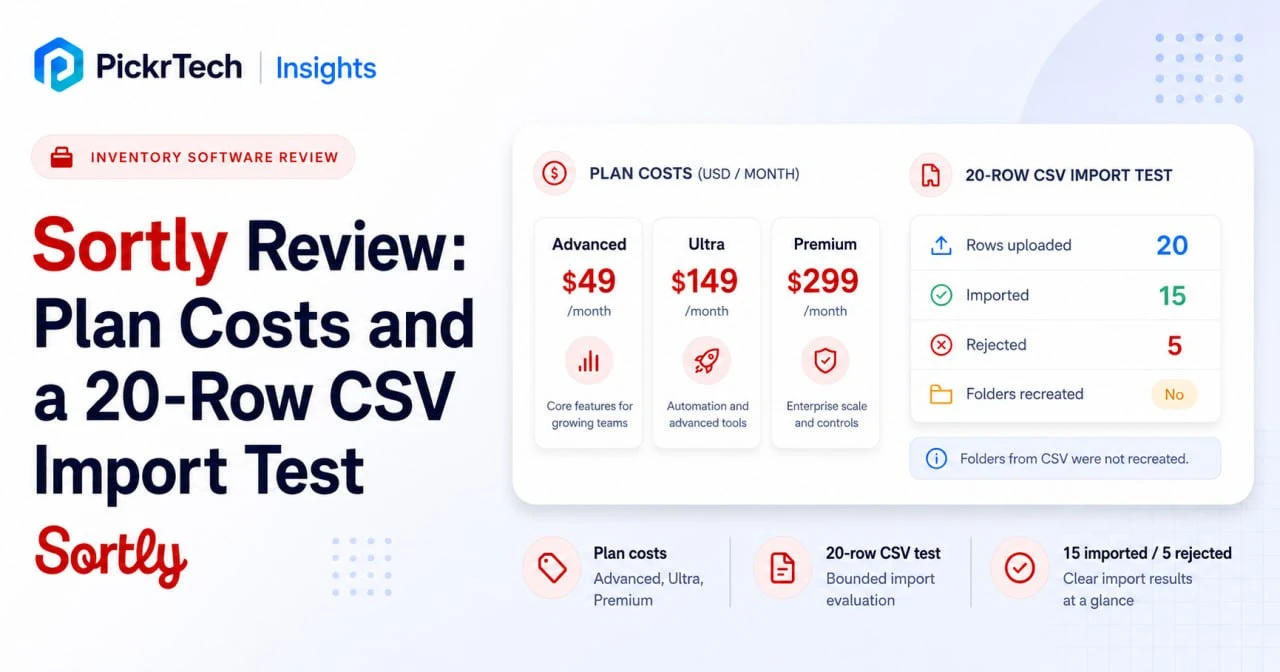
TL;DR: Sortly is worth paying for if your team identifies stock by sight and works from phones — photo-led records, QR labels, and check-in/out that a non-technical crew picks up quickly. Budget for a paid tier from day one: the free plan stops at 100 items and one user, and the standard rates run $49, $149, and $299 a month. Two things decide it before you commit — what your bill looks like in year two, when the first-year discount ends and each of our three team profiles pays about 60% more, and how much of your existing catalog survives the importer. In our test, 15 of 20 rows landed and no folders were created.
Where this Sortly review fits: This page decides whether Sortly belongs in your workflow. If your inventory process isn’t defined yet, start with the inventory management checklist. If Sortly looks right, the Sortly setup guide covers the actual build.
What we tested, and what we only read about
This is a documentation-based evaluation with one bounded hands-on component, and the difference matters when you’re reading operational claims.
What we ran ourselves: in July 2026 we opened a new Sortly account on the 14-day Advanced trial and imported a 20-row sample catalog through Quick Import, once, without editing the file. The observations in this review about that run — column mapping, rejected rows, and the resulting folder structure — come from that single test and are shown in screenshots below. Broader statements about the other import types, units of measure, and per-import limits come from Sortly’s documentation and are cited separately.
What we did not run: we did not test field connectivity, offline sync behavior, or day-to-day scanning across a working crew, and we did not evaluate the free plan or the tiers above Advanced. Where this review describes those, it is describing what Sortly documents, not what we watched happen. Cost figures for year two are our own arithmetic on Sortly’s published rates, not prices Sortly publishes directly.
All prices and plan limits were rechecked against Sortly’s US pricing page in August 2026[1].
Where the photo-first approach pays off
Most small business inventory decisions are visual. A technician hunting for a replacement fitting recognizes it by shape, not by a twelve-digit code. Sortly builds around that: items carry photos and live in a folder tree, rather than sitting in a SKU table with an image field bolted on.
The item screen in our trial account allowed up to 8 photos per item, capped at 30 MB total, in JPG, PNG, or HEIC. That’s generous enough to shoot a fitting from several angles or document rental furniture condition before and after a hire — the use cases where a photo does work a SKU can’t. It also means a catalog of several thousand photo-heavy items carries real storage and sync weight, which is worth thinking about before you commit a large catalog to phones on mobile data.
QR labels turn a phone into the only scanner you need
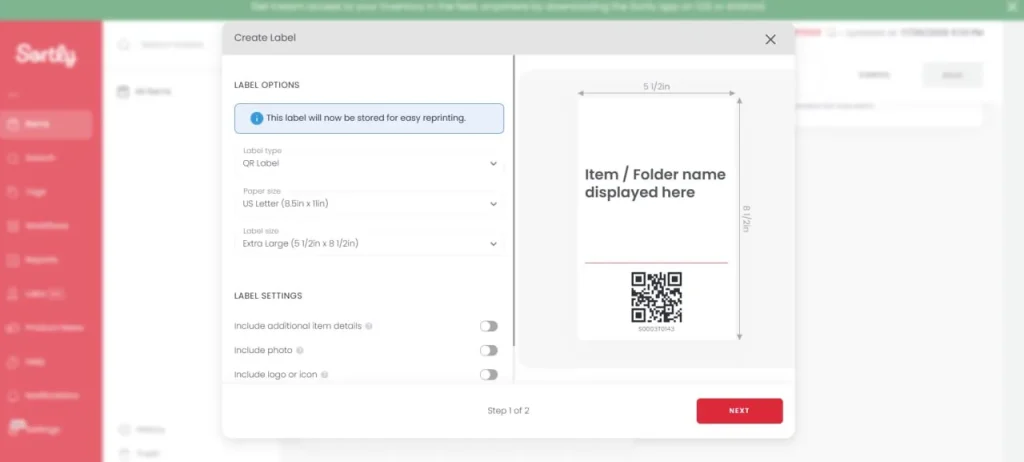
Sortly generates QR labels you print and stick on physical items, and staff scan them with a phone camera to pull up photos, quantity, and movement history[2]. It also reads existing manufacturer barcodes, so you can migrate gradually instead of re-labeling everything on day one. In our trial import, manufacturer barcodes from the CSV attached to items as linked labels without any extra step.
Two tier notes before you plan around this. Creating your own QR labels starts on Advanced. Creating barcode labels requires Ultra. Scanning codes that already exist is a different thing from printing new ones, and the plans gate them separately.
Check-in/out answers the “who had it last” question
Sortly records check-ins, check-outs, and transfers between locations or people. For a service business, that converts a missing $400 tool from an absorbed loss into a traceable custody record. Low-stock thresholds sit on the item itself — our imported items carried a Min Level value and an alert control on the Advanced trial — so a clinic manager can be told when gloves drop below a fortnight’s supply.
The honest caveat is that all of this depends on staff scanning consistently. Skipped check-outs put your data out of step with your shelves, and no software feature fixes that.
What 12 months of Sortly actually costs
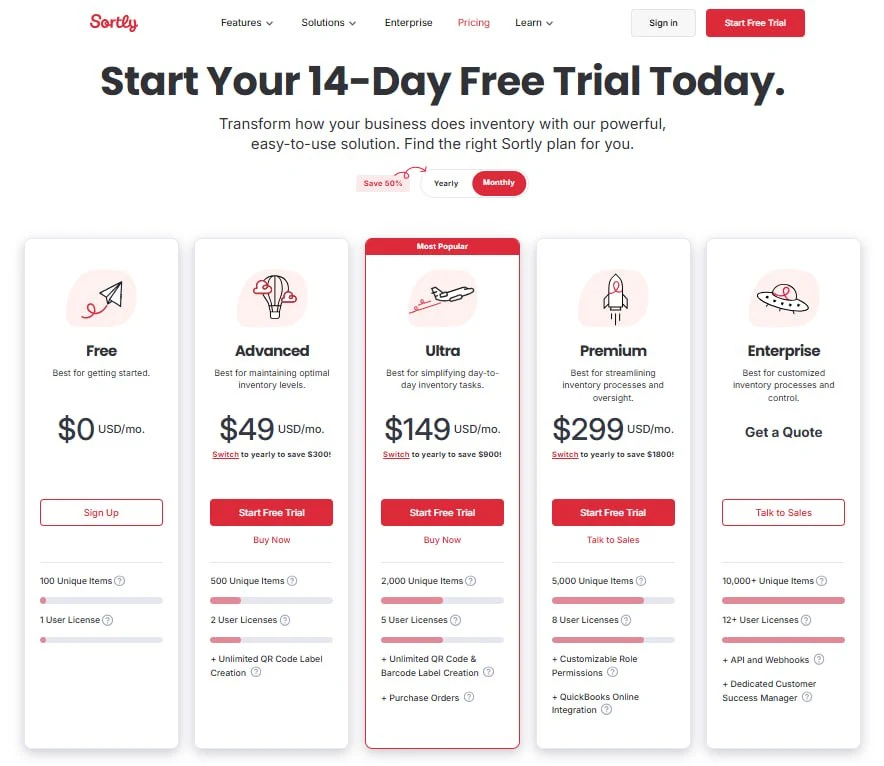
Sortly runs five plans. Standard monthly rates are Free ($0), Advanced ($49), Ultra ($149), Premium ($299), and Enterprise by quote. Yearly billing carries a 50% discount for a new customer’s first year only; from year two, yearly plans carry a 20% discount instead. The two discounts don’t stack — the $24 / $74 / $149 figures the pricing page shows on the yearly toggle are the first-year promotional rate.
| Plan | Standard rate | Items | Users | What the tier adds |
|---|---|---|---|---|
| Free | $0 | 100 | 1 | Photos, folders, in-app scanning |
| Advanced | $49/mo | 500 | 2 | QR code label creation |
| Ultra | $149/mo | 2,000 | 5 | Barcode labels, purchase orders |
| Premium | $299/mo | 5,000 | 8 | QuickBooks Online, custom role permissions |
| Enterprise | Custom quote | 10,000+ | 12+ | API and webhooks, dedicated CSM |
Two limits sit outside that table and can force an upgrade on their own. Custom fields are capped at 1, 5, 10 and 20 across Free, Advanced, Ultra and Premium — relevant the moment you import, since anything Sortly doesn’t have a native field for lands in one. Jobs, which tie items to a project, work order or ticket, cap concurrent jobs at 2, 5, 10 and 15 on the same tiers, with closed jobs not counting toward the limit[1]. Price the tier that contains your must-have feature, not the one that matches your item count.
Three team profiles, year one and year two
Monthly sticker prices hide the number you actually budget against. Here is the annual line item for three representative teams at August 2026 rates. Year 1 figures are the amounts Sortly bills on yearly plans. Year 2+ figures are ours: the standard rate times twelve, less the standing 20% yearly discount.
| Team | Plan | Paid monthly | Year 1, yearly | Year 2+, yearly |
|---|---|---|---|---|
| Solo operator + 1 helper, ~300 items | Advanced | $588 | $288 | ~$470 |
| 5-person field crew, ~1,500 items | Ultra | $1,788 | $888 | ~$1,430 |
| 8-person ops team, ~4,000 items | Premium | $3,588 | $1,788 | ~$2,870 |
⚠ Budget against year two, not year one. The eight-person team above pays $1,788 in its first year and roughly $2,870 in its second — about a 60% increase for the same product and the same headcount. All three profiles land near that same 60% step. It isn’t a price rise; it’s the promotional discount ending, exactly as the pricing page footnote describes[3]. Treat the standard rate as your planning number from day one.
When one more user should mean a seat, not an upgrade
The included user count is not a hard ceiling. Sortly documents an Add Seat control on paid plans and bills extra users beyond your plan’s allowance; paid extra seats can also be removed later, with a credit for the unused time, while seats included in the plan can’t be[4]. The price of an extra seat isn’t published, so you have to read it in your own account — but you can work out in advance what it needs to beat.
An upgrade buys three extra seats each time. Against year-two yearly pricing, moving from Advanced to Ultra costs an extra $960 a year, and Ultra to Premium an extra $1,440. Divide that by the number of people you actually need to add:
| Upgrade (year 2+, yearly) | Extra annual cost | Adding 1 user | Adding 2 users | Adding 3 users |
|---|---|---|---|---|
| Advanced (2 seats) → Ultra (5 seats) | +$960 | Seats win under ~$80/user/mo | under ~$40 | under ~$27 |
| Ultra (5 seats) → Premium (8 seats) | +$1,440 | Seats win under ~$120/user/mo | under ~$60 | under ~$40 |
Read the Add Seat price in your account and compare it against the right column. One extra person on Ultra is almost certainly cheaper as a seat; three extra people rarely are. The rule only holds while your item count sits comfortably inside your current tier — an upgrade also raises the item ceiling and the custom-field and job limits, and if any of those are close to binding, the upgrade is buying more than seats.
Where the free plan stops working
The free plan is an extended trial, not a destination. It caps at 100 unique items and one user, which can work for a solo operator or a proof of concept but fails when a second person needs access. It also includes one custom field and one month of activity history, and it can’t create custom units of measure at all — only paid plans can[5]. Reorder thresholds are unaffected because Min Level is a native field. In the Quick Import flow we tested, SKU, folder path, and warranty date each mapped to a custom field; a free account’s single custom-field allowance could not preserve all three in the same mapping, while the Advanced trial’s five covered them with room to spare.
If you’re weighing this against staying in a spreadsheet a while longer, our guide on when a spreadsheet stops being enough covers the switching triggers directly.
The trial requires a card and converts automatically
Sortly’s 14-day trial runs on paid plans, requires a credit card up front, and becomes a paid subscription at the end unless you cancel first. A reminder email arrives three days before. Pilot on the tier you’d actually buy: Advanced or above is required to test QR label creation, while purchase orders require Ultra or above. Put the cancellation date in your calendar the day you start. The subscription begins on whichever billing interval you selected when creating the trial, so a Premium trial set to monthly billing converts to $299 a month.
Where Sortly stops keeping up
Getting your existing catalog in is the first real obstacle
This is the part we tested directly, and it produced the clearest limitation in this review. We uploaded a 20-row sample catalog — plumbing and electrical van stock, with SKUs, barcodes, tags, reorder levels, and three-level folder paths — and did not edit the file at any point.
Before that matters, know which importer you’re using. Sortly documents three, and they are not interchangeable[6]:
| Import type | Built for | Creates folders during import | Sortly template required |
|---|---|---|---|
| Basic | Items into a single folder when you have no existing spreadsheet | No | Yes |
| Quick | An existing .csv or .xlsx you don’t want to reformat; items into a single folder | No | No |
| Advanced | Items across multiple folders, the folders themselves, and item variants | Yes | Yes — fixed column order and headers |
That table explains our single largest finding before we get to it: we used Quick Import, and Quick Import does not build your folder tree.
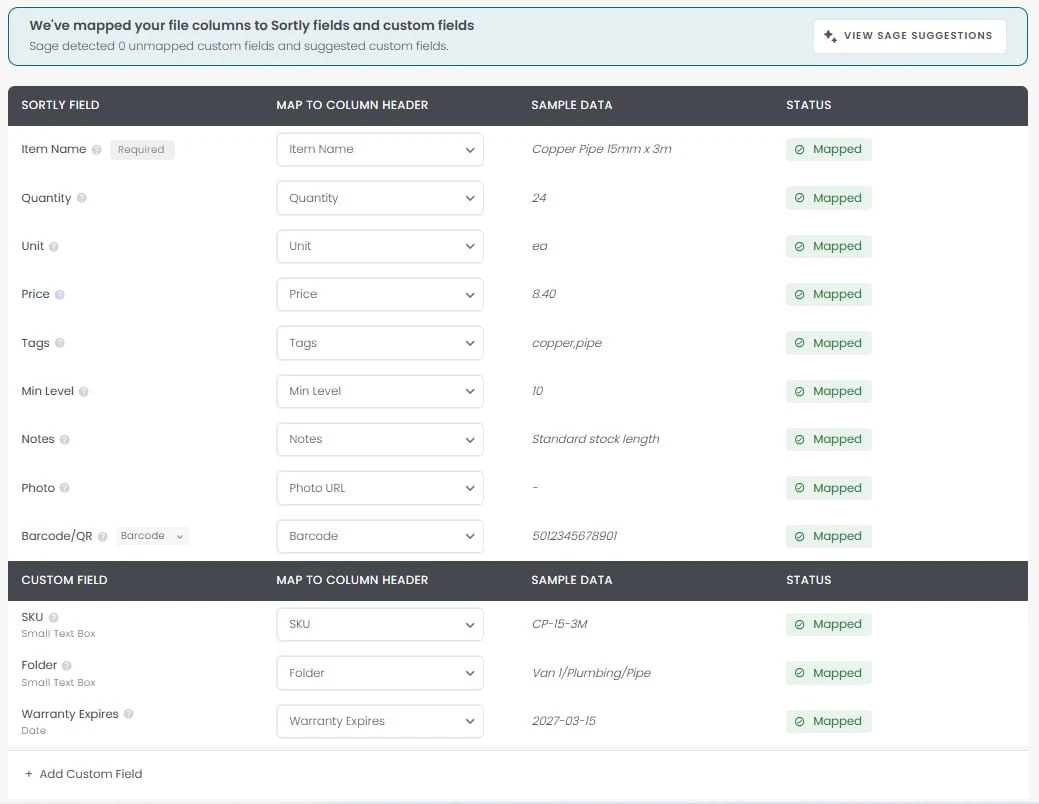
Mapping went well. All twelve columns matched, and SKU, folder path, and a warranty date were preserved as custom fields rather than discarded. The folder path stayed a text string on each item, so a hierarchy written as Van 1/Plumbing/Fittings did not become navigable folders in this run.
One documentation gap is worth naming here. Sortly’s import article states that custom fields and custom units must exist in the account before any import[6]. On the Quick Import mapping screen we saw, an Add Custom Field control and an AI suggestion prompt were both available at the mapping step, so in that flow the fields did not have to be created first. We did not test whether the same holds for the Advanced Import template, where the documentation is explicit that pre-created fields must exist before you download the template or they won’t appear in it.
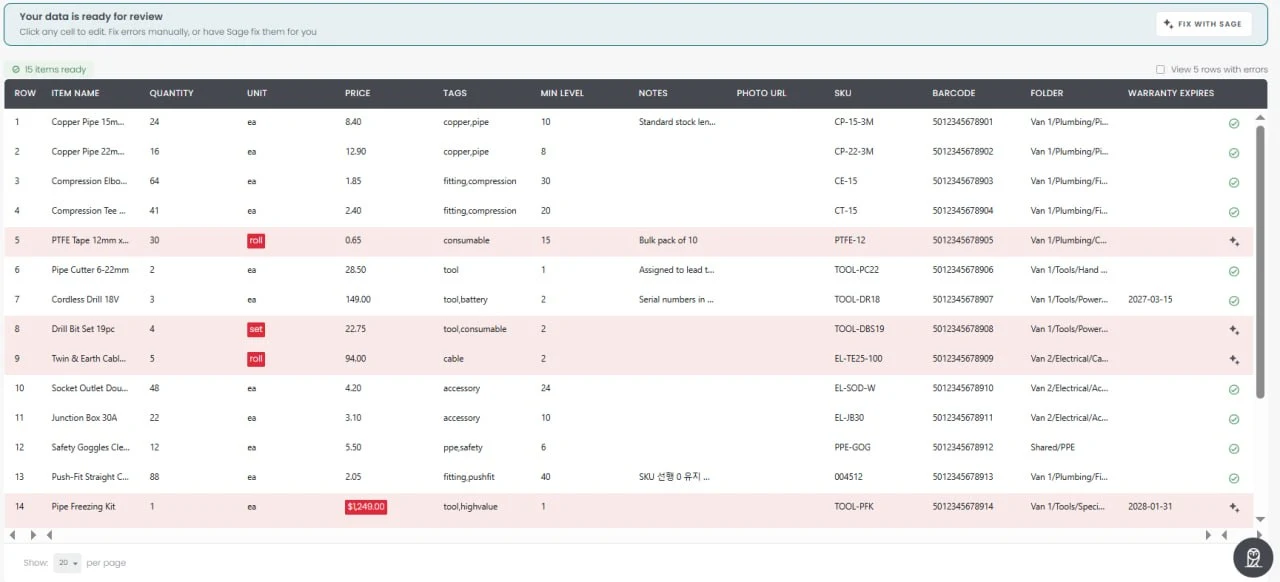
The validation step rejected five of the twenty rows. Three failed on unit values, including roll and set. That result needs care, because Sortly’s units documentation lists Roll as a built-in standard unit with the abbreviation rl, alongside Each (ea), Box, Pack, Case and Pallet[5], while the same article and the import article both require custom units to exist in the account before an import will accept them. Since we did not retry the rejected rows with rl or with pre-created custom units, this test establishes only that the original spelled-out values were rejected — not which correction each row needed. One row failed because the quantity cell read 12 ea instead of 12. One failed because the price was written as $1,249.00 with a currency symbol and a thousands separator. These are ordinary spreadsheet conventions worth normalizing before you upload.
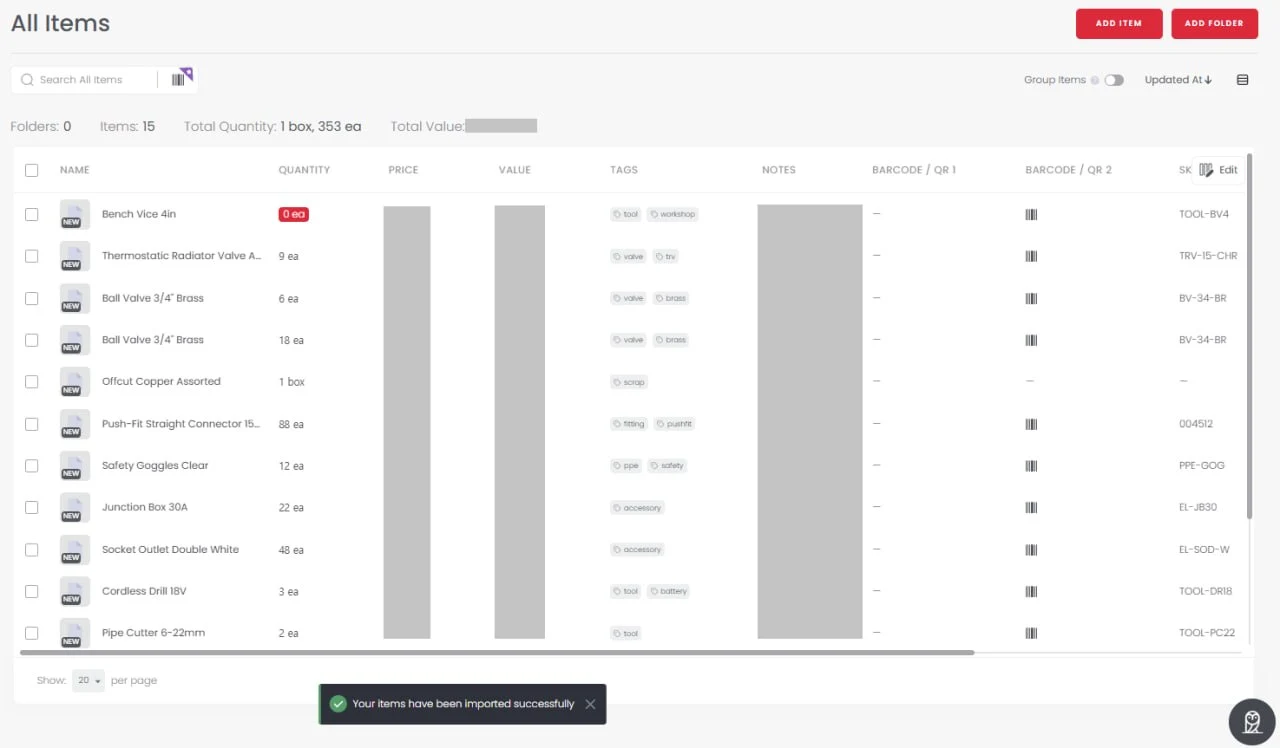
Fifteen items landed. Folder count: zero. The screen we ended up on was the item list, with a toast reading “Your items have been imported successfully” and no restatement of the five rows left behind. Nothing was hidden — the review screen flagged them beforehand, and Sortly documents a completion screen that offers a downloadable import report[6]. The practical point is that the last thing you see is a green success message, and on a 500-item migration that same proportion is 125 missing items behind it.
Two smaller findings from the same run: two rows carrying an identical item name and SKU in different locations were created as two separate items rather than merged, and a SKU with a leading zero (004512) kept it. Sortly’s AI assistant offered to fix errors on both the mapping and review screens; we declined, so these figures describe an unassisted import.
A migration sequence that survives the above
Combining what we saw with what Sortly documents, this is the order we’d run a real catalog in:
- Decide the importer first. If your folder hierarchy has to survive, that means the Advanced Import template and its fixed column order — not Quick Import.
- Create your custom fields and any genuinely custom units in the account before you start, and do it in the web app: custom units can’t be managed on mobile, are capped at 25 per account, and can’t be renamed once created[5].
- Normalize the file. Match unit values to Sortly’s exact abbreviations, strip currency symbols and thousands separators from prices, keep quantity cells purely numeric, and format dates as MM/DD/YY.
- Check the file against your plan’s per-import ceiling. One import can’t exceed 500 lines on Advanced, 2,000 on Ultra, 5,000 on Premium or 10,000 on Enterprise, and folder rows count toward it[6].
- Import a 20-row slice first, on the tier you intend to buy, and reconcile the row count yourself rather than trusting the success message.
- If rows fail, delete the successfully imported items before re-uploading the corrected file. Re-importing a file that still contains the successful rows creates them a second time.
One constraint deserves separate mention because it shapes your longer-term process: bulk import adds new items only. Sortly documents that updating existing inventory from a spreadsheet is not supported, and that updates run through the API, which is an Enterprise feature. If your plan was to keep a master spreadsheet and push periodic corrections into Sortly, that plan doesn’t work on a small-business tier. If your catalog still lives in a spreadsheet, our barcode scanner and Excel inventory guide covers structuring that data cleanly in the first place.
Reporting depth, and how far back your data goes
Sortly’s plan structure limits how far back you can analyze activity and transactions. Activity history is retained for one month on Free, one year on Advanced, three years on Ultra, and without limit on Premium and Enterprise; transaction reports follow the same ladder. A five-person crew on Ultra can look back three years, but a two-person business on Advanced loses visibility beyond twelve months, which rules out most year-over-year analysis.
If your accountant needs accounting-grade inventory valuation methods, aging analysis, or demand forecasting, Sortly isn’t designed to provide them. Its Inventory Summary can show current quantity and value, but the QuickBooks Online integration on Premium and Enterprise sends invoices and purchase orders to QBO[7] — that is a document handoff, not two-way inventory accounting.
Scale and multi-location limits
Sortly represents locations — warehouses, trucks, job sites — as folders and subfolders rather than as a separate location system, which is why the import question above is a structural decision rather than a formatting one. We did not test a large multi-site deployment, and the 5,000-item Premium ceiling and 10,000+ Enterprise threshold are plan boundaries, not usability thresholds we verified. If you run many sites or a central distribution model, load a representative multi-location slice during the trial and test search, transfers, permissions, and mobile navigation at realistic scale.
Getting your data back out
CSV and Excel exports include item details, custom fields, folder and location data, and public URLs for item images — but not the image files themselves. Sortly documents a Dropbox export when you need both the structured data and the original photos, and a PDF export when you want images embedded in a readable report[8]. Run the export paths you’d actually rely on during the trial, and keep a recurring export afterward: it doubles as a backup and as your exit route.
Who should choose Sortly, and who should look elsewhere
Sortly earns its place when visual identification and mobile access are the job, and the catalog is small enough that browsing still beats querying. Choose it if:
- You run a service business, rental operation, or single-site warehouse where picking accuracy depends on recognizing the item
- Your team works from phones and you’d rather not buy scanning hardware
- Your catalog sits between 100 and 5,000 items with straightforward categorization, and the matching tier’s annual cost is acceptable at the renewal rate
- Pushing invoices and purchase orders into QuickBooks Online is enough of a finance workflow, and Premium’s price is worth it to you
Look elsewhere if:
- You run multiple warehouses with transfer routing and bin-level tracking
- Finance needs inventory valuation, aging reports, or demand forecasting — Sortly’s reporting isn’t built for it, and on Advanced your history window is a single year
- Your operating model depends on pushing spreadsheet updates back into the system, since bulk import only adds new items and the API is Enterprise-only
- You need manufacturing workflows, bills of materials, or production tracking
- Your data model needs relationships and custom views more than photos — in which case compare small business database software instead
If it looks like a fit, use the 14-day trial to test a representative slice of real inventory on the tier you’d actually buy. Check three things: whether staff scan consistently, whether imported totals reconcile with the source file, and whether the available reports answer your routine questions. If you continue past the trial, schedule a 30-day review before expanding the catalog or adding users. If you’re already waiting on reports Sortly doesn’t produce, move early — migrating inventory data twice costs far more than switching once. The Sortly setup guide covers the build itself.
If Sortly isn’t the one
The reason you’re ruling Sortly out usually points somewhere specific. If order volume rather than item count is your constraint, Zoho Inventory prices on monthly orders — its free tier allows 50 orders, one user and one location, and paid tiers start at 500 orders a month with sales-channel integrations including Amazon, eBay and Shopify[9]. If you expect manufacturing or multi-warehouse work within 12–18 months, Odoo’s One App Free plan covers Inventory alone at no cost for unlimited users, but installing a second app moves the account onto the all-apps Standard plan, priced per user per month with a discount that lasts twelve months[10]. On list rates that puts a five-person team in roughly the same annual range as Sortly Ultra’s second year — the discount cliff is not a Sortly quirk.
For a full side-by-side on free-plan limits and operating constraints across the category, see our inventory management tools comparison.
Sources and notes
- Sortly Pricing Page — tier prices, unique-item, user-license, custom-field, job and activity-history limits, and 14-day trial terms including the credit-card requirement. Checked August 2026. ↩ prices and limits · ↩ custom fields and jobs
- Sortly QR Code & Barcode Scanning — scanning and label-generation documentation. ↩
- Sortly Pricing Page, discount footnote — the 50% discount applies to the first year of new subscriptions only; a 20% discount applies to yearly plans thereafter. Checked August 2026. ↩
- Sortly Help Center: Manage Team — included seats, the Add Seat control, extra billing beyond included seats, and credit on removal of paid additional seats. Checked August 2026. ↩
- Sortly Help Center: Managing Units of Measure — built-in standard units and abbreviations including Roll (
rl), custom-unit creation limits, web-app-only management, and the paid-plan requirement. Checked August 2026. ↩ free-plan restriction · ↩ standard units · ↩ custom-unit limits - Sortly Help Center: Bulk Importing New Items/Folders — Basic, Quick and Advanced import types, folder creation during import, pre-created custom fields and units, the completion screen and import report, per-plan per-import line limits, duplicate handling on re-import, and the absence of spreadsheet-based updates. Checked August 2026. ↩ import types · ↩ pre-created fields · ↩ import report · ↩ per-import limits
- Sortly Help Center: QuickBooks Online Integration — Premium and Enterprise eligibility and the supported invoice and purchase-order workflows. Checked August 2026. ↩
- Sortly Help Center: How to Export Your Inventory — CSV/Excel contents including custom fields and folder data, image URLs versus image files, PDF reports, and Dropbox exports. Checked August 2026. ↩
- Zoho Inventory Pricing — free-plan order, user and location limits, paid tiers, and add-ons, US pricing. Checked August 2026. ↩
- Odoo Pricing — One App Free plan, per-user all-apps Standard and Custom plans, the twelve-month discount condition, and the upgrade path triggered by installing a second app, US pricing. Checked August 2026. ↩
Last reviewed: August 2026 by the PickrTech editorial team. Hands-on observations come from a single 14-day Advanced trial account in July 2026 and a one-off 20-row Quick Import. Year-two cost figures are PickrTech calculations from Sortly’s published standard rates and stated yearly discount. Prices and plan details reflect vendors’ public US pricing pages at that date; SaaS packaging changes, so the linked sources above are the canonical reference.