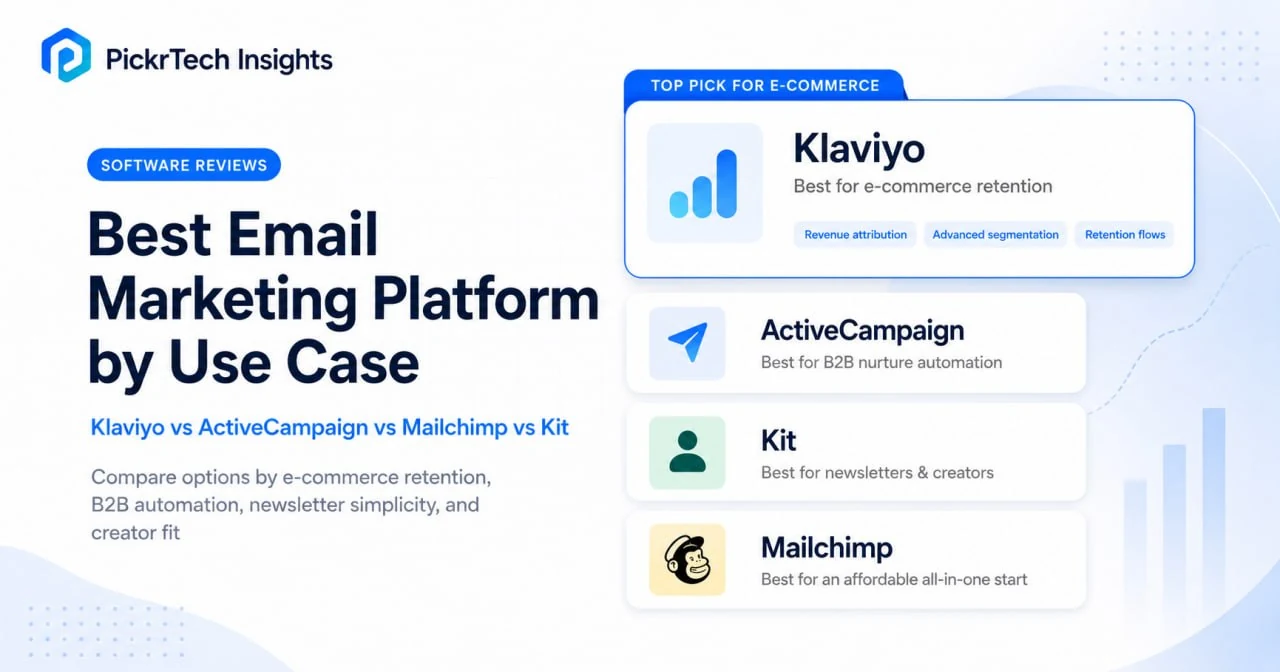
TL;DR — pick by workflow, not feature list. Selling on Shopify or WooCommerce? Klaviyo — per-campaign revenue attribution is worth paying for once email is a real revenue channel. Building a newsletter or creator audience? Kit — its free plan covers 10,000 subscribers, so many creators pay nothing until they cross that ceiling. Running multi-month B2B nurture with branching logic? ActiveCampaign — but budget for the Plus tier at $49/mo, not the $15 Starter, and treat the sales-pipeline CRM as a paid add-on. Small business just wanting a cheap, all-in-one starting point? Mailchimp — as a paid tool, with Standard at $25/mo for up to 500 contacts; the free plan caps at 250 contacts with no automation.
A newsletter, a B2B nurture sequence, and an e-commerce retention engine all send email, but their requirements barely overlap — which is why a single “best email tool” ranking sends most people to the wrong choice. This guide compares practical entry costs at a common small-list size, then matches four common workflows to the tool that fits. If you want a beginner launch checklist instead, use the Mailchimp email marketing checklist; if you are building the wider store stack, start with the Shopify, WooCommerce, and BigCommerce comparison.
What each platform actually costs at the same list size
Sticker prices mislead because every platform bills differently. The table below compares the subscriber-list tools at a common small-list size using one consistent set of assumptions, so you can see where the cheaper option flips. ActiveCampaign is handled separately below because its cost is driven by automation tier and add-ons rather than list size, and Mailchimp’s higher contact bands should be confirmed on its live slider before you rely on them.
- Email only — no SMS, which is billed separately on Klaviyo.
- A clean list — no unsubscribed or cold padding. On Mailchimp, unsubscribed contacts still count toward your bill until archived, so real spend runs higher than shown.
- The realistic automation tier — Mailchimp Standard for businesses that need automation beyond the four-step limit available on Essentials.
- Monthly billing throughout this table, read from each vendor’s pricing page in July 2026.
| List size (see note) | Mailchimp Standard | Klaviyo Email | Kit Newsletter/Creator |
|---|---|---|---|
| 500 | $25/mo | $20/mo | Free |
These are directional comparisons rather than identical billing units: Mailchimp bills marketing contacts (including unsubscribed), Klaviyo bills active profiles, and Kit bills unique, active subscribers. Mailchimp Standard scales through higher contact bands; confirm the exact figure at your band on Mailchimp’s live pricing slider. ActiveCampaign is shown separately because its practical cost depends more heavily on the automation tier and CRM add-ons selected.
Two things do most of the decision work. First, at a small list Mailchimp Standard and Klaviyo are close on price, and the two bill on different units — Mailchimp counts every contact including unsubscribed, while Klaviyo counts only active profiles — so identical list sizes can bill differently over time; the deciding factor is usually whether you need e-commerce revenue attribution, not the sticker. Second, Kit is free to 10,000 subscribers while the other two start charging once you scale past their free tiers — then Kit hits a hard step-up the moment you cross 10,000. If your workflow fits Kit’s broadcast-and-sequence model, that free ceiling is often the entire decision.
Match the platform to your workflow
Newsletters and creator audiences: start free on Kit
For a blogger, podcaster, or newsletter writer building an audience from zero, Kit is the pick — and the reason is cost, not features. The free Newsletter plan supports up to 10,000 subscribers with unlimited sends, landing pages, and forms; Mailchimp caps free at 250 contacts, Klaviyo at 250 profiles, and ActiveCampaign has no free plan at all. Kit counts only unique, active subscribers, so unsubscribed and duplicate contacts don’t inflate your number.
The catch is feature-gating, not price: the free plan allows one automation and one sequence, puts Kit branding on your emails, and enrolls you in the Creator Network. The bigger consideration is the step-up. Once you need a second automation — or you cross 10,000 subscribers — you move to the paid Creator plan, which at the 1,000-subscriber band costs $39/month on monthly billing ($33/mo billed annually, $390/year), and at the 10,000-subscriber band reaches $139/month on monthly billing (about $116/mo billed annually) after Kit’s September 2025 price increase. At larger list sizes a newsletter-first rival like Beehiiv becomes worth comparing. Switch trigger: approaching 10,000 subscribers, or needing branching automation Kit’s broadcast model doesn’t do.
E-commerce retention: Klaviyo, once email is a revenue channel
If email is a meaningful share of store revenue and you need to see which campaigns drove which sales, Klaviyo is the strongest fit. Native Shopify and WooCommerce sync pulls in catalog, order history, and on-site behavior, giving per-campaign revenue attribution and predictive signals — expected next-order date, predicted lifetime value, churn risk — inside the platform, without wiring up external analytics for basic tracking.
The cost is profile-shaped. Since February 2025 Klaviyo bills on every active profile in your account, not just the ones you email — so a cold subscriber you haven’t touched in months still costs money, and suppressing unengaged profiles becomes a billing task rather than housekeeping. Email pricing runs $30/month at 1,000 profiles, $100 at 5,000, $150 at 10,000, and $400 at 25,000, with SMS stacked on top. There is no built-in sales CRM, so a B2B seller would maintain Salesforce or HubSpot alongside it. Switch trigger: if email isn’t yet producing measurable, attributable store revenue — or your list is under a few hundred contacts with only seasonal sends — Mailchimp’s lower entry is the better fit until send volume becomes predictable.
Example break-even check (plug in your own numbers, not a benchmark): required extra monthly revenue = added monthly platform cost ÷ gross margin. If a platform costs $75/month more than your current tool and your gross margin is 60%, it needs to generate about $125 in extra monthly revenue to pay for the difference.
B2B nurture automation: ActiveCampaign, but price the Plus tier
For B2B teams running three- to six-month sales cycles with conditional lead nurturing, ActiveCampaign is the fit — provided you budget honestly. Its automation builder handles deep branching, nested conditions, and goal-based exits, and an event-tracking API can trigger sequences from in-app behavior like feature usage or login frequency, which is what makes it work for SaaS onboarding and churn-prevention flows.
The entry price is the trap. There is no free plan — only a 14-day trial capped at 100 contacts and 100 emails. Starter runs $15/month (1,000 contacts, annual billing) but limits automations to 5 actions with no branching, which rules out the exact workflows you’d choose ActiveCampaign for. The realistic tier is Plus at $49/month (1,000 contacts, annual billing), where unlimited automation actions and branching unlock. The base marketing plans include contact management and CRM integrations, but pipeline management, deal records, and lead scoring require an Enhanced CRM add-on available on Plus and above — so a true marketing-automation-plus-sales-pipeline setup costs more than the base email plan alone. Budget real ramp-up time to learn the builder. Switch trigger: if your flows never exceed a few linear steps, this depth is overhead, not value. Evaluating standalone CRMs too? Compare options in the CRM for small business guide.
Cheap all-in-one starting point: Mailchimp, as a paid tool
Mailchimp still suits a small business that wants one tool for email, landing pages, and forms — but treat it as a paid product, not a free one. The free plan supports up to 250 contacts and 500 sends per month but does not include Marketing Automation Flows. Essentials is the lower-cost entry tier and supports automation limited to four flow steps; Standard costs $25/month for up to 500 contacts and supports the deeper automation most businesses actually need, with up to 200 flows. More than 300 integrations also reduce the need to connect several separate tools early on.
Its billing model is the thing that surprises teams, covered in the next section. Switch trigger: plan the migration path before contact-based pricing climbs through higher contact bands — to Klaviyo if you sell online, to ActiveCampaign if you’re running B2B nurture.
Real annual costs and billing traps
Every platform here has one billing quirk that pushes real spend above the advertised tier. Know yours before you sign an annual contract, then check the 12-month math below.
- Mailchimp counts contacts you’re not even emailing. Subscribed, non-subscribed, unsubscribed, and duplicates across audiences all count until you archive them — 2,000 subscribers plus 800 old opt-outs bills as 2,800. Real spend can run well above the listed tier on an uncleaned list. Rules are on Mailchimp’s pricing help page.
- Klaviyo bills active profiles, cold or not. Since February 2025, any reachable profile counts even if you haven’t emailed it in months — but unsubscribed and suppressed profiles are not billed, so regular suppression directly lowers the bill. SMS compounds spend on top.
- ActiveCampaign’s Starter is a false floor — and new accounts now bill unsubscribes. The 5-action cap forces the jump to Plus at $49/month for real branching, and the sales-pipeline CRM is a separate add-on on top. Since November 2025, accounts opened after that date are also charged for all contacts, including unsubscribed and bounced. Price the real plan on ActiveCampaign’s pricing page.
- Kit is free to 10,000, then steps up. Creator runs $39/month (monthly) at 1,000 subscribers and $139/month at 10,000; selling digital products carries a 3.5% + $0.30 fee on every plan, including free. Only unique, active subscribers count toward the limit.
Twelve-month totals for representative setups at July 2026 rates. Mailchimp and Klaviyo rows are monthly price × 12; ActiveCampaign and Kit rows are official annual-contract totals. These assume a flat list; in reality your list grows, so treat them as floors, not ceilings.
| Team profile | Plan (billing basis) | Effective monthly | 12-month total |
|---|---|---|---|
| Small business, 500 contacts | Mailchimp Standard (monthly) | $25 | $300 |
| Shopify store, 5,000 profiles | Klaviyo Email (monthly) | $100 | $1,200 (email only — SMS billed separately) |
| B2B team, 1,000 contacts | ActiveCampaign Plus (annual) | $49 | $588 (base plan only — sales-pipeline CRM add-on extra) |
| Creator, 1,000 subscribers | Kit Creator (annual) | ≈$33 | $390 |
| Creator, 10,000 subscribers | Kit Creator (annual) | ≈$116 | ≈$1,390 |
Two patterns hold up. The creator path is the only one with a genuine $0 year — Kit stays free to 10,000 subscribers — and even its first paid year at 1,000 subscribers ($390) costs less than four months of Klaviyo at store scale. And ActiveCampaign’s $588 base is only part of the B2B picture: the sales-pipeline CRM is a separate add-on, so a real email-plus-pipeline setup costs more than the base plan alone.
Final verdict and switching signals
| Platform | Realistic entry plan | Best-fit workflow | Primary cost risk & reason to switch |
|---|---|---|---|
| Kit | Free to 10,000 subs; Creator $39/mo ($33 annual) | Newsletters, creators, course sellers | Step-up to $139/mo (≈$116 annual) at 10,000; switch when you cross the ceiling or need branching |
| Klaviyo | Free: 250 profiles/500 sends; from $20/mo (500) | Shopify/WooCommerce stores where email drives revenue | Active-profile billing + SMS stacking; switch down to Mailchimp if revenue isn’t attributable yet |
| ActiveCampaign | No free plan; Plus $49/mo is the real entry | B2B nurture with branching + lead scoring | Starter’s 5-action cap and add-on CRM; switch up to Plus once flows branch |
| Mailchimp | Free: 250 contacts, no automation; Standard $25 (500) | Small business wanting a cheap all-in-one start | Counts unsubscribed & duplicate contacts; switch when rising contact-band costs outweigh its all-in-one convenience, or the workflow needs stronger e-commerce attribution or deeper B2B automation |
Frequently asked questions
What happens when my list grows beyond 10,000 subscribers?
It depends on the billing model. On Kit, 10,000 subscribers is the free ceiling — cross it and you move to the paid Creator plan, which runs $139/month on monthly billing (about $116/month billed annually) at that band and climbs from there. Mailchimp and Klaviyo have no free tier at that scale: Mailchimp Standard steps up through contact bands (confirm the exact figure at your band on Mailchimp’s slider, and note it counts unsubscribed contacts too), while Klaviyo bills by active profile (about $150/month at 10,000, rising to $400 at 25,000). For ActiveCampaign, list size matters less than which automation tier and CRM add-on you need — a small B2B list on Plus with the sales-pipeline add-on can cost more than a larger creator list on Kit.
Can I switch providers without losing my subscriber list?
Yes. Your list is your data, and all four platforms export contacts as CSV. Download from your current tool, bulk-import into the new one, and repoint your website signup forms. The harder part is migrating active automations — welcome sequences, abandoned-cart flows, and nurture drips must be recreated manually. Kit includes migration assistance with every paid plan: Essentials migration covers lists below 10,000 subscribers, while Concierge migration for lists of 10,000 or more also rebuilds forms, automation emails, templates, and selected integrations. If you’re still moving customer data out of spreadsheets first, the spreadsheet-to-CRM guide covers cleanup and field mapping.
Is Klaviyo worth it for a small e-commerce store?
Klaviyo becomes easier to justify once email already produces measurable, campaign-attributable store revenue and you’ll act on that attribution when allocating budget — the native Shopify sync and per-campaign revenue reporting are the payoff. To pressure-test the cost, use the break-even model above: required extra monthly revenue = added monthly platform cost ÷ gross margin. For a store with only a few hundred contacts sending occasional seasonal campaigns, Mailchimp’s lower entry price is the better fit until send volume is predictable.
Next steps
- Setting up e-commerce email flows? Start with the online store preparation guide.
- Starting on Mailchimp? Run the Mailchimp email marketing checklist before your first send.
- Need CRM handoff from your email tool? Compare CRM tools for small business.
Sources
- Mailchimp — pricing and how contacts are counted (checked July 2026) — https://mailchimp.com/help/about-mailchimp-pricing-plans/
- Mailchimp — marketing plan pricing (checked July 2026) — https://mailchimp.com/pricing/marketing/
- Klaviyo — official pricing page (checked July 2026) — https://www.klaviyo.com/pricing
- ActiveCampaign — official pricing page (checked July 2026) — https://www.activecampaign.com/pricing
- ActiveCampaign — overview of plans and CRM add-ons (checked July 2026) — https://help.activecampaign.com/hc/en-us/articles/14251311251356-Overview-of-ActiveCampaign-plans
- Kit — official pricing page (checked July 2026) — https://kit.com/pricing
Disclaimer
This guide is for general informational purposes only and does not constitute professional or financial advice. Pricing, features, and plan details were checked against each product’s official website in July 2026 and may change without notice — vendors in this category adjust free-tier limits and prices frequently, so confirm current rates on the official pricing pages before committing to an annual plan.
Last reviewed: July 2026 by the PickrTech editorial team.