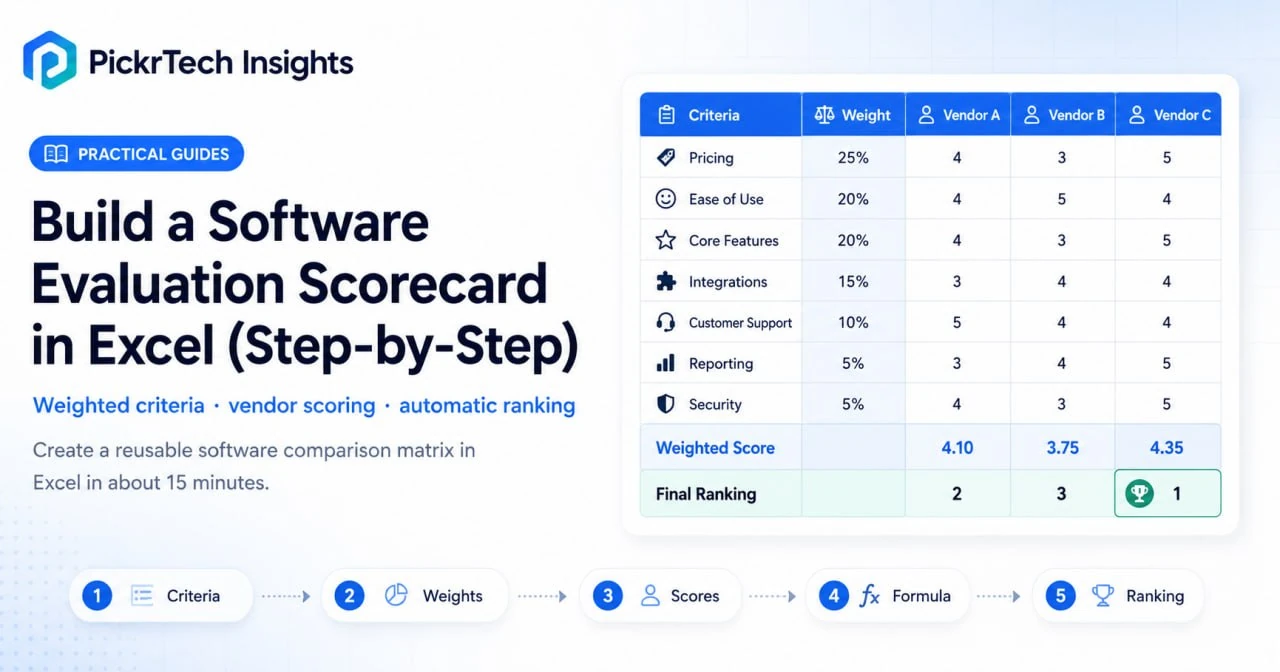
Build a Software Evaluation Scorecard in Excel (Step-by-Step) hero image
This article may contain affiliate links. We may earn a commission when you sign up through our links — at no extra cost to you. Our recommendations are based on independent evaluation and are not influenced by commissions.
TL;DR: Create a reusable software comparison matrix in Excel to systematically score and rank multiple vendors. Set evaluation criteria, assign importance weights, input scores, and use formulas to calculate totals automatically. You’ll have a shareable decision-making tool ready in 15 minutes.
- Define 5-8 evaluation criteria that matter most to your business
- Assign percentage weights so pricing, ease-of-use, or support align with your priorities
- Build formulas that auto-calculate weighted scores and reveal your top vendor instantly
Before you begin: What you’ll need
Account requirements: A free Microsoft account. Excel for the Web is accessible at no cost and includes all spreadsheet functionality needed to build and maintain a software evaluation scorecard. No paid Microsoft 365 subscription is required.
Data to gather beforehand:
- List of 2-5 software vendors you plan to evaluate
- Key evaluation categories relevant to your business (examples: Pricing, Ease of Use, Customer Support, Core Features, Integration Capabilities, Reporting)
- Internal priorities: Which factors matter most? Pricing constraints? Team size compatibility?
Permissions and access:
- Sign in to your Microsoft account
- Create a new workbook in Excel for the Web
- Share the file with team members if decisions require group input
Estimated time: 15 minutes
Difficulty level: Beginner
Cost: Free (Excel for the Web requires only a free Microsoft account)
Step-by-step walkthrough
This walkthrough will guide you through building your evaluation scorecard from scratch. By the end, you’ll have a working tool that consolidates vendor scores and surfaces your best option automatically.
Step 1: Open a new workbook and define your evaluation criteria
Navigate to excel.office.com and sign in with your Microsoft account. Click “New blank workbook” to create a fresh spreadsheet. The file will automatically save to your OneDrive.
Start by labeling your criteria. In cell A1, type “Evaluation Criteria”.
Then in cells A2 through A8, enter the 5-8 categories that will form the basis of your comparison. Depending on your industry, critical criteria might include:
- Pricing (subscription cost, implementation fees)
- Ease of Use (learning curve, UI intuitiveness)
- Customer Support (response time, availability)
- Core Features (do the core functions solve your problem?)
- Integrations (connects with tools you already use)
- Reporting & Analytics (dashboards, data export)
- Security & Compliance (data protection, certifications)
Keep your list focused. Typically, more than 10 criteria can dilute the decision and waste time. Your chosen criteria should directly reflect what your business needs from the software.
Expected result: Column A contains a clear, vertical list of 5-8 evaluation categories. You’ve narrowed the focus to what truly matters.
💡 Pro tip: Involve your team when defining criteria. Sales might prioritize ease of use, while finance cares about pricing and reporting. Getting input upfront prevents scope creep later.
Step 2: Assign weights to each criterion
Not all criteria are equally important. In cell B1, add the header “Weight (%)”. In cells B2 through B8, assign a percentage value to each criterion that reflects its importance to your decision.
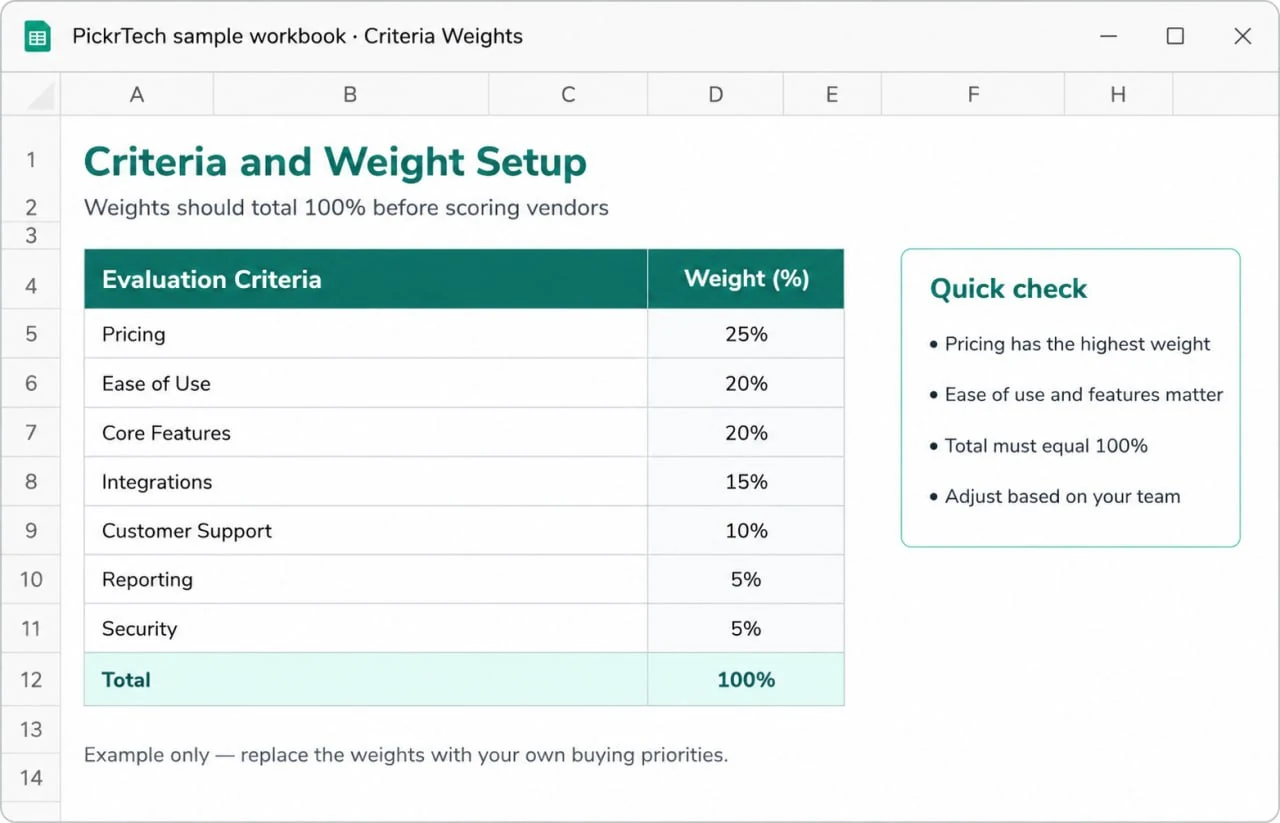
Excel software evaluation scorecard criteria and weight setup example with percentage weights totaling 100 percent
For example:
- Pricing: 30%
- Ease of Use: 25%
- Core Features: 20%
- Customer Support: 15%
- Integrations: 10%
The percentages must total exactly 100%. To verify, click on cell B9 and enter the formula =SUM(B2:B8). This cell should display 100. If it shows a different number, adjust individual weights until the total reaches 100%.
Weights should ideally reflect your unique business priorities. A bootstrapped startup might weight pricing heavily (40%) while a large enterprise prioritizes support (25%) and features (35%). This conversation itself is valuable—it forces alignment on what your team actually cares about.
Expected result: Column B contains percentage weights that total exactly 100%. You now have a mathematical foundation that reflects your business priorities.
💡 Pro tip: Use round percentages (10%, 15%, 20%, 25%, 30%) for simplicity. Avoid overly granular weights like 17% or 23%—they rarely add precision and complicate mental math during discussions.
Step 3: Set up your software vendor columns
Move to cell C1 and begin labeling your vendor comparison structure. This layout separates raw scores from weighted calculations for clarity:
- C1: Software Vendor Name (e.g., “HubSpot CRM”)
- D1: “Raw Score”
- E1: “Weighted Score”
Repeat this three-column pattern for each software you’re evaluating. If comparing three vendors—say, HubSpot, Salesforce, and Pipedrive—your headers would span columns C–E (HubSpot), F–H (Salesforce), and I–K (Pipedrive).
In row 1, write the names of the actual software options. Keep names short but identifiable so there’s no confusion during team discussions.
The structure looks like this:
Evaluation Criteria | Weight (%) | HubSpot Raw | HubSpot Weighted | Salesforce Raw | Salesforce Weighted | ...
Expected result: Your scorecard now has a clear structure with vendor names at the top and space for raw and weighted scores below. The layout supports easy formula copying and reduces data entry errors.
💡 Pro tip: Leave one blank column between vendor sections for visual separation. It makes the spreadsheet easier to read during team review meetings.
Step 4: Create a standardized scoring scale
Define how you’ll grade each criterion so all evaluators use the same standard. Create a reference table at the bottom of your sheet (or on a separate area). Here’s a commonly used 1–5 scale:
Scoring Scale:
1 = Poor / Does Not Meet Needs
2 = Below Average / Partially Meets Needs
3 = Average / Meets Basic Needs
4 = Good / Exceeds Expectations
5 = Excellent / Fully Meets Needs
Document this scale directly in your workbook so every team member references the same definitions. This helps standardize subjective evaluations when evaluators reference common definitions—for instance, knowing that a “4” means the software significantly exceeds expectations, not just barely works.
Alternatively, use a 1–10 scale if you want more granularity. The 1–5 scale is simpler for small teams and faster to discuss.
Expected result: A visible scoring key is documented in your workbook. This prevents inconsistent grading (e.g., one person’s “3” matching another person’s “2”) and makes the final scores defensible during team discussions.
💡 Pro tip: Pair your scale with real examples. For “Ease of Use”, describe: “A 5 means my team needed zero training. A 3 means one 30-minute training session. A 1 means we’d need a consultant.”
Step 5: Input formulas to calculate weighted scores
Now the spreadsheet does the math for you. Click on cell E2 (the first weighted score cell for your first vendor’s first criterion). Enter this formula:
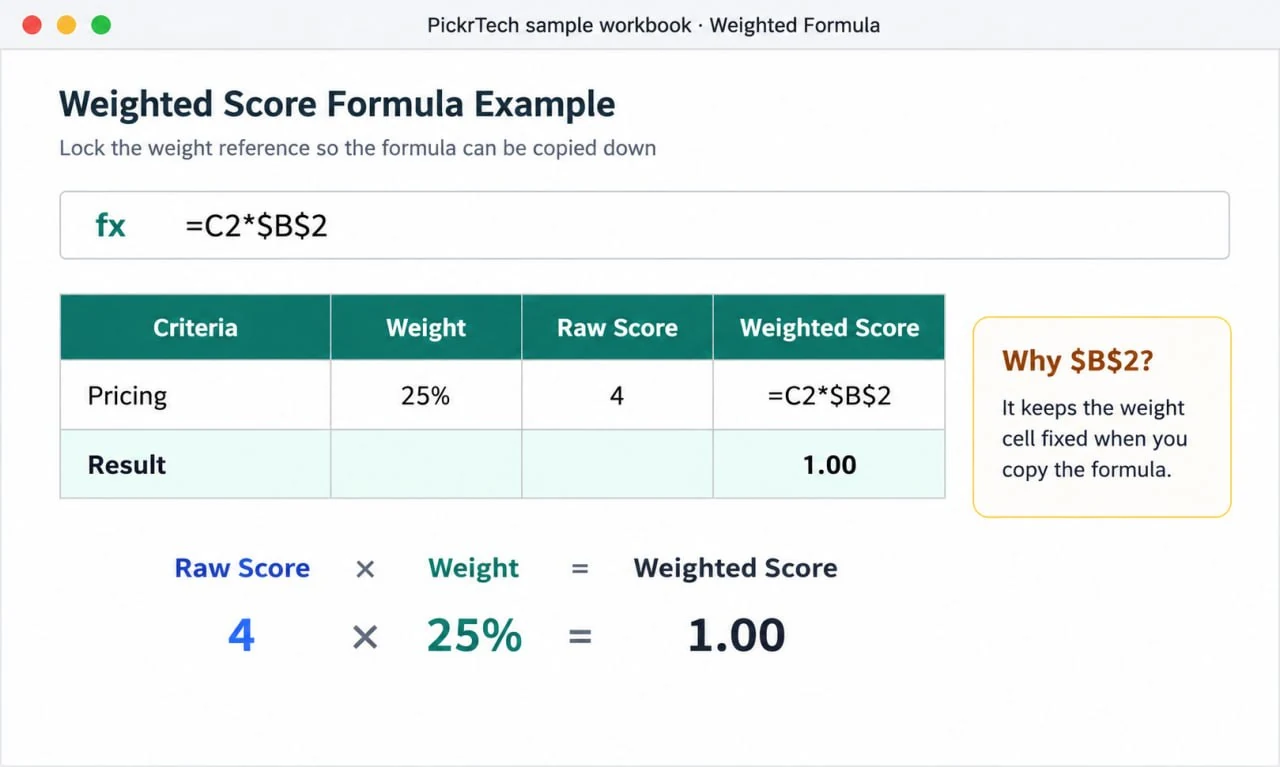
Excel weighted score formula example showing raw score multiplied by fixed weight reference
=C2*$B$2
This multiplies the raw score (in C2) by the weight (in B2). The dollar signs ($) lock the reference to column B so when you copy the formula down, it always pulls the correct weight.
Press Enter. The result will be blank until you input raw scores, which is normal.
Now copy this formula to all weighted score cells. Click E2, copy it (Ctrl+C or Cmd+C), then select the entire range of weighted score cells (for three vendors over seven criteria, that’s roughly E2:K8) and paste.
Next, add total rows. In cell E10 (or below your last criterion row), enter:
=SUM(E2:E8)
This sums all weighted scores for your first vendor. Copy this formula across to the total row for each vendor.
Expected result: Your formulas are in place. Raw scores will automatically convert to weighted scores, and final totals will calculate instantly as you enter data. The spreadsheet is now a working evaluation tool.
💡 Pro tip: Test the formulas by entering sample scores (e.g., all 3s or 4s) before finalizing the template. Verify that totals look reasonable.
Step 6: Add conditional formatting for visual comparison
Make the highest-scoring vendor jump off the screen. Select the final total row (cells containing the SUM formulas, like E10:K10 across all vendors). Go to the Home tab and click “Conditional Formatting” > “Color Scales”. Choose a gradient like Green (high scores) to Red (low scores).
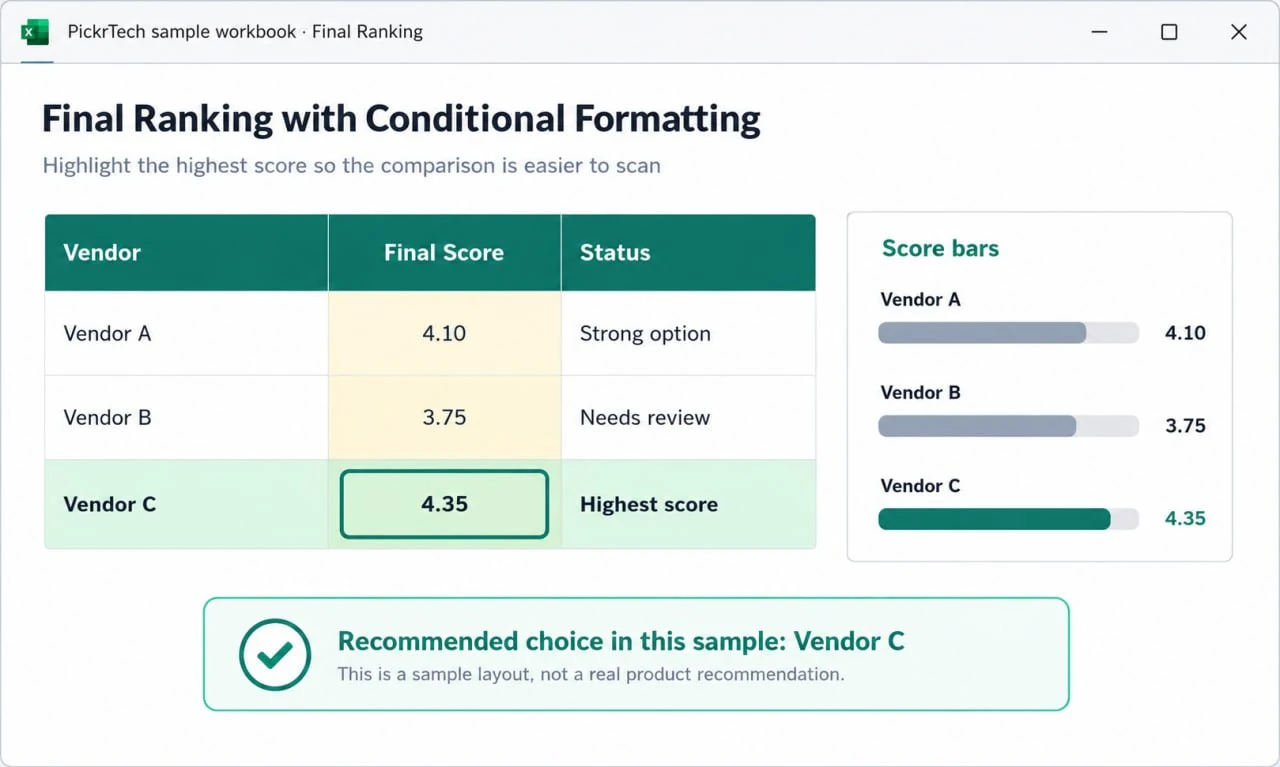
Excel scorecard final ranking table with conditional formatting and highlighted highest vendor score
Excel will automatically color-code your final totals. The highest score appears green, the lowest appears red, and mid-range scores display intermediate colors. This makes it instantly obvious which vendor scored best without squinting at numbers.
You can also apply this to the full weighted score range if you prefer a heat map across the entire scorecard. The color gradient adapts to your actual data, so it’s always relative to the vendors you’re comparing.
Expected result: The final total cells are color-coded, with the highest-scoring vendor visually prominent. Team members can grasp the ranking at a glance.
💡 Pro tip: Avoid over-formatting. Highlighting only the final totals keeps the focus on the decision outcome. Too many colors make the spreadsheet harder to read.
Step 7: Test and lock your reusable template
Enter sample scores (raw numbers like 3, 4, or 5) into a few cells to verify the formulas calculate correctly. If your weights sum to 100% and your raw scores multiply properly, the totals should fall within a reasonable range (roughly 3–5 if using the 1–5 scale).
Once you’re confident the formulas work, save this as your master template. Click File > Save As, and choose “Excel Template” (.xltx) as the file format. This creates a clean starting point for future evaluations—when you open it to evaluate new software, the structure and formulas remain intact, but you’re working on a copy.
Optionally, protect the sheet to prevent accidental formula edits during team input. Right-click the sheet tab, select “Protect Sheet”, and choose a simple password (or leave it blank for basic protection). Before protecting, unlock the raw score input cells: select cells C2:K8, right-click > Format Cells > Protection tab > uncheck “Locked”. This allows team members to enter scores while keeping your formulas safe.
Expected result: You have a reusable template saved as an .xltx file. Formulas are verified and working. The scorecard is ready to use for your current software evaluation and as a standard tool for future vendor comparisons.
💡 Pro tip: Add a notes column (column L, for example) labeled “Comments” so evaluators can record why they scored a vendor a certain way. “Pricing” might score a 2, but the note “expensive for our small team” explains the rating and surfaces concerns during decision meetings.
Common problems and fixes
Anticipating these issues will save you time during implementation and help you troubleshoot quickly if something doesn’t work as expected.
- The SUM total for the Weight column displays 0% or #VALUE! error
⚠️ Cause: Percentage weights were entered as text instead of numbers
🔧 Fix: Select the weight cells, right-click, choose Format Cells, set category to Percentage, and retype the numbers as numerals - Dragging the weighted score formula down results in incorrect totals or #REF! errors
⚠️ Cause: The formula is not using an absolute reference for the weight column
🔧 Fix: Edit the formula to include dollar signs (e.g., change B2 to $B$2) to lock the cell reference so it doesn’t shift when copied - Conditional formatting does not apply correctly, highlighting only one cell or the wrong row
⚠️ Cause: The formatting rule was applied to a single cell instead of the full total range
🔧 Fix: Clear existing conditional formatting, select the entire final total column range (e.g., E10:K10), and re-apply the conditional formatting rule - Unable to type raw scores into evaluation cells after protecting the worksheet
⚠️ Cause: Input cells were not unlocked before sheet protection was enabled
🔧 Fix: Unprotect the sheet, select the raw score input cells (C2:K8), right-click > Format Cells > Protection tab > uncheck Locked, then re-protect the sheet
Verification checklist
This verification ensures your scorecard will work reliably for decision-making. Run through each item before you start using it with your team.
- ✅ All 5–8 evaluation criteria are clearly listed in column A
- ✅ Percentage weights in column B total exactly 100%
- ✅ Vendor names are labeled at the top, with Raw Score and Weighted Score columns for each
- ✅ Formulas multiply raw scores by weights and SUM the totals (test with sample data: e.g., 4 × 30% = 1.2)
- ✅ Conditional formatting is applied to final total cells, showing color gradient from highest to lowest score
- ✅ Sheet protection is enabled (optional) with input cells unlocked and formula cells locked
- ✅ File is saved as an Excel Template (.xltx) for future reuse
- ✅ Scoring scale reference (1–5 or 1–10) is documented somewhere visible in the workbook
When to consider a different approach
Scenario 1: Your team needs real-time collaboration across multiple locations
If five people need to evaluate software simultaneously and see each other’s scores update live, Excel for the Web offers co-authoring, but dedicated SaaS evaluation platforms may provide better commenting, discussion threads, and audit trails. Consider a comparison article exploring specialized evaluation software if this applies to your team. Compare tools using our CRM software guide.
Scenario 2: You’re evaluating 10+ software vendors with 15+ criteria
Excel becomes unwieldy at scale. Your spreadsheet risks becoming hard to navigate, and manual data entry introduces errors. Dedicated vendor evaluation platforms often include databases of pre-built criteria, automated scoring algorithms, and reporting features that save time when evaluating many options.
Scenario 3: You need to pull live data from vendors’ pricing pages or API data
If you want your scorecard to auto-pull pricing updates or feature availability from vendor websites, Excel’s manual entry becomes a bottleneck. Automation tools or specialized procurement platforms integrate directly with vendor systems and refresh data automatically.
For most small business teams evaluating 2–5 software options, Excel often provides efficiency and transparency. You control the criteria, see every score, and can justify every decision. The trade-off is manual data entry—but for a one-time evaluation, that trade-off usually favors Excel’s simplicity.
Frequently asked questions
Q: Can multiple team members score the same vendors simultaneously?
A: Yes. Save your workbook to OneDrive and share it with team members. Excel for the Web enables live co-authoring, so you can watch scores appear in real-time. However, for large teams, consider having each evaluator complete a copy independently, then merge results into a master scorecard. This prevents unconscious bias—one person’s high score influencing another’s judgment. Parallel evaluation is often cleaner than live collaboration.
Q: What if two vendors tie—same final score?
A: Add a tiebreaker column. Re-weight the criteria slightly, or score the tied criterion more carefully by creating sub-scores (e.g., break “Ease of Use” into “dashboard usability” and “learning curve”). Alternatively, look at the criteria breakdown: if Software A and B tie overall, but A scores 5 on Support (your highest-weight criterion) while B scores 3, A is the safer choice. The detailed scores, not just the final total, guide the decision. In practice, true ties are rare when you’ve done careful evaluation.
Q: Should I weight criteria equally or differently?
A: Always weight them. Assigning equal weight (14% to each of seven criteria) means price matters as much as support, which is rarely true. Unequal weights force conversations: “Do we really care equally about price and features?” These conversations clarify what your business actually values, not just what it claims to value. Equal weighting is lazy—avoid it.
Q: Can I use this scorecard to evaluate non-software vendors (e.g., agencies, consultants)?
A: Absolutely. The framework works for any vendor comparison. Adjust criteria to fit: Price, Portfolio Quality, Communication, Timeline, References instead of Feature Alignment and Support. The scorecard is just a structure—the criteria and weights are what you control.
Q: What’s the best way to involve leadership in scoring?
A: Have team members who’ll use the software daily score first and independently. Then have a facilitated discussion where leadership reviews the scores and asks why certain vendors scored low on high-weight criteria. This prevents leadership from overriding on hunches and grounds decisions in data your team collected. You’ll often find that leadership’s gut instinct aligns with the data—but when it doesn’t, the scorecard provides language for the conversation.
Recommended first 30-minute setup order
- Minutes 0–5: Define your criteria. List 5–8 evaluation categories that matter to your business. Brainstorm with team members if possible. Write them in column A.
- Minutes 5–10: Set weights. Assign percentages to each criterion so they total 100%. Discuss with leadership or stakeholders to align on priorities. This is the most important decision—take the time to get it right. If you’re rushing, spend these five minutes; skip the others.
- Minutes 10–20: Build the structure. Label vendor columns, add raw and weighted score columns, and enter formulas. Copy formulas down so they’re ready for data entry. Test with sample scores.
- Minutes 20–30: Format and save. Apply conditional formatting to final totals, document your scoring scale, and save the workbook as a template. Protecting the sheet can wait if time runs short—get the core scorecard working first.
What to skip initially: Protect the sheet only if you plan to share with less technical team members. Detailed comments can be added later. The goal is a working scorecard you can use today, not a polished product.
Setup mistakes to avoid
Too many criteria. Listing 12 or more criteria makes the scorecard tedious and dilutes focus. Stick to 5–8. If someone says a new criterion is important, ask them to suggest which existing criterion it should replace or be merged with. This forces prioritization.
Ignoring weights. Assigning all criteria equal weight (20% each for five criteria) wastes the power of weighting. Have a real conversation: Does pricing matter as much as ease of use to your team? Weights should reflect that debate. Equal weights are a shortcut—don’t take it.
Vague scoring definitions. A “3” on Ease of Use means different things to different people. Define your scale upfront with concrete anchors (“1 = requires consultant training, 5 = team learns in one hour”). Consistency prevents inflated scores and makes the final ranking defensible.
Overcomplicating formulas. Stick to multiplication and SUM. Don’t add IF statements, nested logic, or conditional sums unless you’re advanced with Excel. Simple formulas are easier to audit and trust when presenting results to decision-makers. You’re building a tool for a team decision, not a statistical model.
The Verdict
A software scorecard is most useful when a team needs to turn vague preferences into a repeatable decision process. Its value is not just in assigning numbers. The real benefit is forcing everyone involved to agree on the criteria before the tool debate turns into opinion, habit, or brand bias.
This approach works especially well when you are comparing a manageable shortlist and need a structured way to weigh cost, integration fit, usability, and operational risk. It is less effective when teams treat the spreadsheet as a substitute for real testing. A scorecard can narrow the field and improve alignment, but it cannot tell you how a tool behaves inside your actual workflow unless you pair it with a trial or implementation test.
In practice, the scorecard should be treated as a decision framework, not a final truth machine. Use it to create a more disciplined shortlist, then validate the top option with hands-on testing before rollout. That combination is usually much stronger than either intuition alone or spreadsheet logic alone.
- Use this scorecard when you need to compare a shortlist in a way that is more consistent than informal discussion.
- Do not rely on it alone when setup complexity or workflow fit can only be judged through hands-on use.
- Best next step: score first, shortlist second, then validate the winner in a real trial.
Sources and notes
- Microsoft Excel official page — used to verify free web access and core spreadsheet functionality
- Microsoft support: Create a workbook in Excel — used to confirm workbook creation steps
- Microsoft support: Switch between relative, absolute, and mixed references — used to verify formula cell reference behavior
- Microsoft support: Use conditional formatting to highlight information — used to confirm color scale application
- Microsoft support: Lock cells to protect them — used to verify sheet protection and selective cell locking
- Microsoft support: SUM function — used to confirm aggregation formula syntax
Disclaimer
This guide is for general informational purposes only and does not constitute professional accounting, tax, legal, or financial advice. Pricing, features, and plan details were verified against each product’s official website as of the research date and may change without notice. Always consult a qualified professional for advice specific to your business situation. PickrTech may earn a commission when you sign up through our links at no extra cost to you. Our recommendations are based on independent evaluation and are not influenced by compensation.
Last reviewed: June 2026 by the PickrTech editorial team.